Dashboard
The Competitions page displays all competitions in a tabular format, grouped by their respective status.
In each status-based table, users can view key information about each competition, including its name, the designated prize pool, and the associated casino brands and games.
Competitions can be searched by name or reference ID, and filtered by type (Tournament, Raffle, or Quest) using the controls above the table.
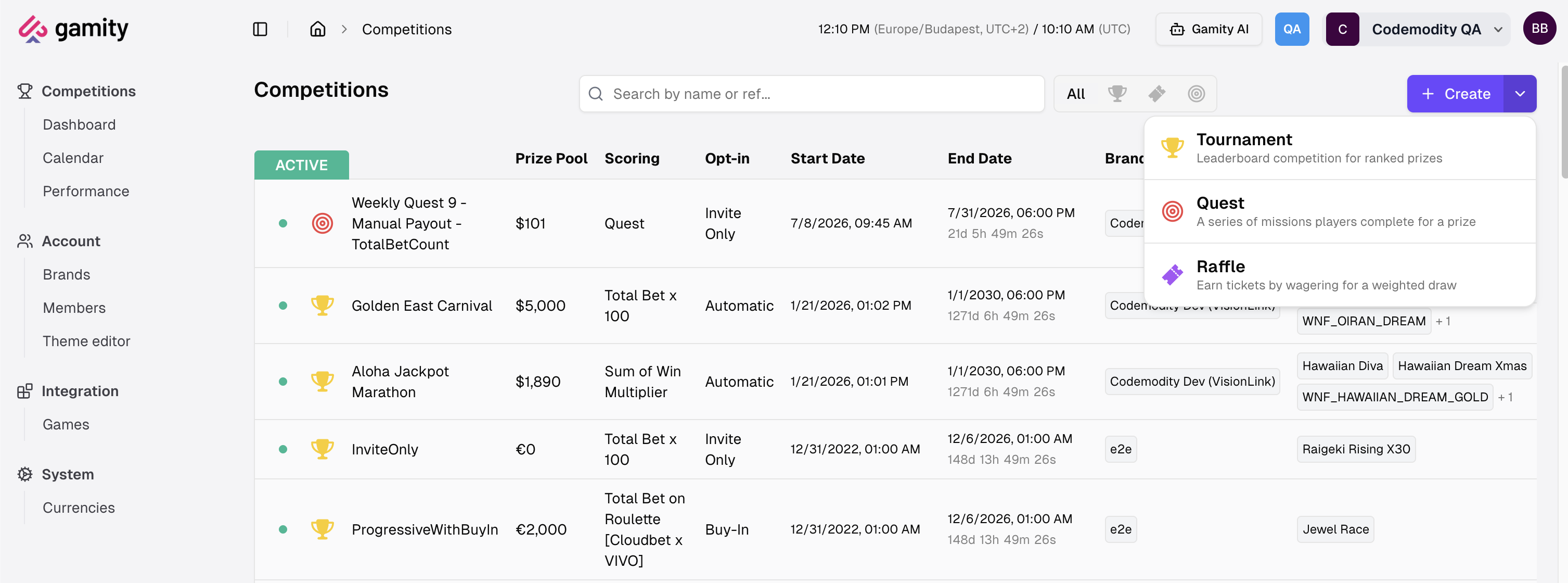
Creating a competition
The Create button at the top of the page opens a menu to start a new competition. Choose the type:
- Tournament: a leaderboard competition for ranked prizes.
- Quest: a series of missions players complete for a prize.
- Raffle: earn tickets by wagering for a weighted draw.
Competitions can also be created from the Calendar.
Statuses
Competitions are grouped by status, which reflects where each one is in its lifecycle. For the full lifecycle, including how it differs between tournaments, quests, and raffles, see Lifecycle & statuses.
| Status | Description |
|---|---|
| Draft | The configuration of the competition is incomplete, and details still can be edited. The competition will not launch on its starting date / time |
| Scheduled | The configuration of the competition is finalized, and it is waiting for the start date to begin. |
| Active | The competition is currently running and most of its details are read-only. |
| Finished - Not paid out | The competition has ended but the prize payout process is not yet complete. |
| Paid Out | The prize money has been successfully distributed to all eligible winners, or there were no eligible winners to pay. |
| Cancelled | The competition has been canceled. |
Payout Status Badges
For a Finished competition, a badge next to its name summarizes its payout state at a glance.
| Badge | Shows | Meaning |
|---|---|---|
| 3 | Number of failed payouts | Manual intervention required. One or more payouts failed and will not be retried automatically. |
| 2 | Number of failed payouts | Pending auto-retry. An auto-payout failed with a temporary error and is waiting to retry. |
| 5 | Number of participants waiting for approval | Waiting for approval. A manual competition finished with winners ready to be paid. |
| ✓ | A checkmark | Ready to finalize. A manual competition finished with no eligible winners and can be marked Paid Out. |
Only the highest-priority badge is shown. For how payouts work and what each state means, see Payout.